Contents
Practical AI system for teams

PROMPT
ANATOMY

This lesson gives you a five-part prompt framework, a quick send check, a copy-ready library, and a short quiz for teams and leaders. Official site: www.promptanatomy.app.

From AI guesswork to a clear operating system: less rework, more control.

Start with the 2-minute practice, then download the PDF when you need it.
Next: template, slide framework, and send check.

Basics

What is a prompt?

Two definitions and a one-minute rule (strip).
Five-step framework — when answers stay fuzzy and you still need fixes.

Prompt

Short instruction to the AI so you get a concrete result.

In practice

“Do X according to Y and return Z in this format.”

Prompt engineering

How you write a prompt: specification → structure → iteration.

Goal

Specification → structure → iteration. Less guesswork, more stability through repeats.

Quick start (~1 min)

Rule: Goal + Input + Output.

“Goal: [WHAT I WANT]. Input: [PASTE TEXT]. Output: 7 bullet list with A/B/C priorities.”

Next Framework ↓

Steps

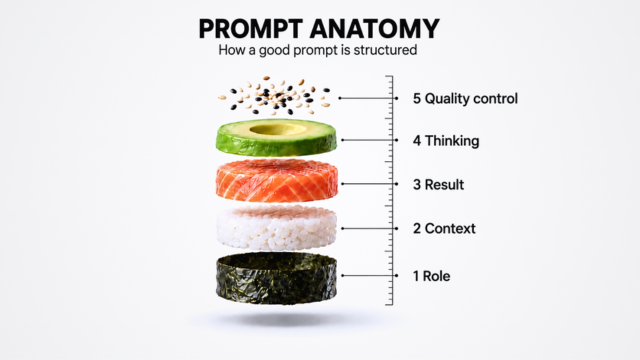
Prompt anatomy framework

Each block adds clarity. Often 2–3 are enough; use all five when you cannot risk mistakes.

1
Role Who you are and why the AI should work this way
2
Context Facts, audience, constraints, sources, what people already know
3
Reasoning Steps, criteria, how to decide
4
Output Format, length, example, done criteria
5
Quality control Check before you send (especially to clients or leadership)
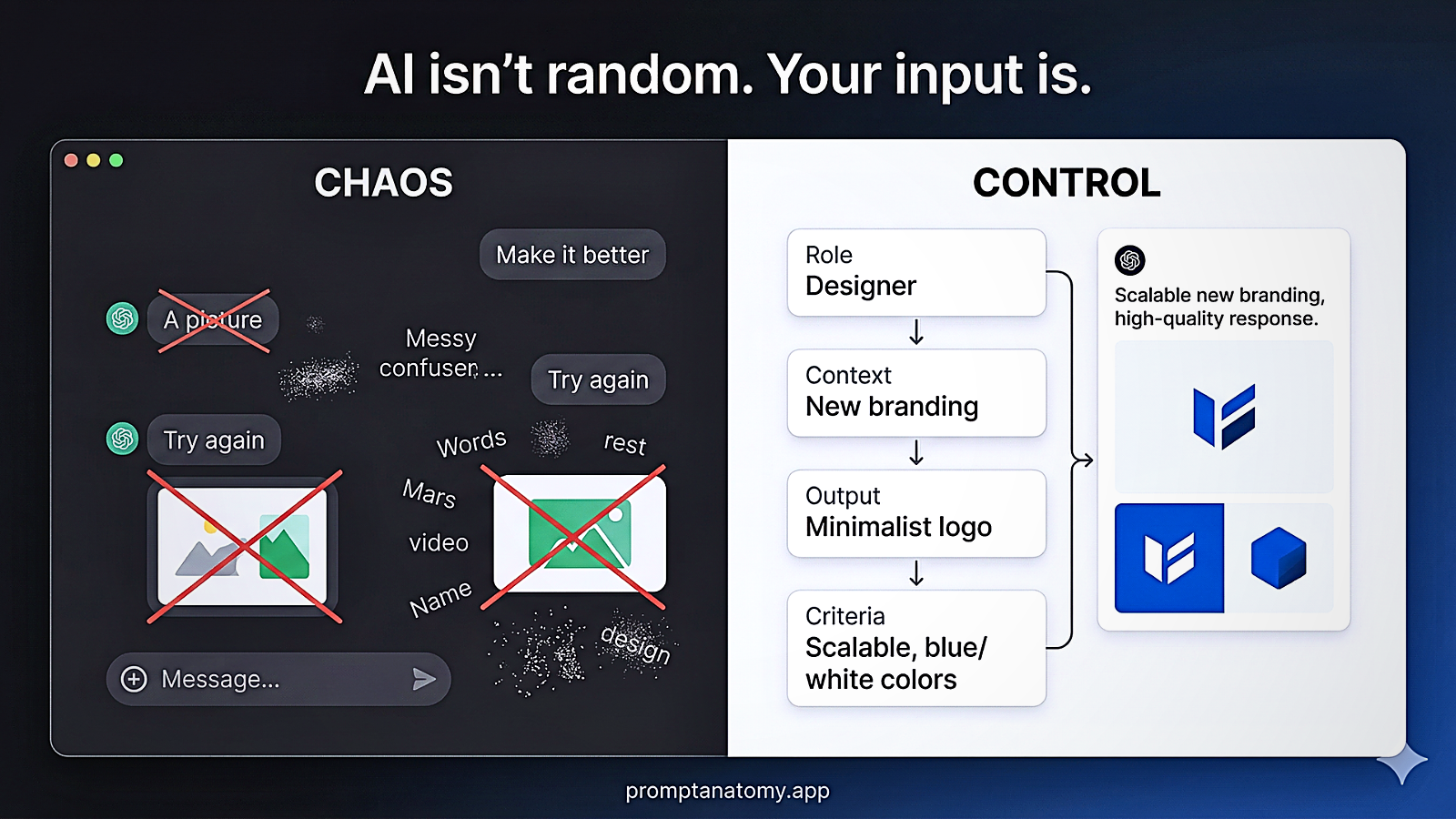
Meme after basics cards: the AI mirrors how clear your input is — structure the prompt.
Practice

Start in 2 minutes

Same Q3 goal — framing changes what you get.
Flow: fuzzy → structure → short self-check.

Before (fuzzy)

Without a frame the AI fills gaps by guessing.

Prompt

“Prepare a report on our Q3 initiative.”

Risk

  • Unclear audience and format
  • Numbers may be invented
  • Missing your context

After (with anatomy)

Same goal — clear prompt, usable output.

Structure

Role work assistant
Goal Q3 plan, what to do this week
Input [emails / notes]
Output 7 bullets, A/B/C + deadlines

Full prompt is copied with the Copy button.

Output

A clear list you can use or delegate immediately.

Check (30 sec)

Full send check — on the next slide.

What to check

  • Are facts true?
  • What context is missing?
  • What are 2–3 risks?
  • What to verify with an independent source?
Roadmap

Your path to save up to 5 hours weekly

Six steps in order: quick send check first, then five deeper templates. Times are indicative.

Quick send check 5–15 min
Meeting or sprint plan 30–90 min
Same message — three levels 20–60 min
Content feedback 20–60 min
Assignment / team learning 15–45 min
Email or message (draft) 10–30 min
Up to ~5 hrs / week total (depends on how often you use it)
Safety

Quick send check

Paste the full text you plan to send or submit to a client, leadership, or partner (e.g. email, report, or proposal draft) — not a random chat reply.
This check reviews facts and risks before you send.

ROLE You are a responsible specialist and information critic: you know the AI can be wrong or invent facts.
CONTEXT Where I will use it: [client email / internal report / proposal / contract / deck]. Domain: [Domain], audience: [Audience]. Paste the full AI draft you plan to send or submit as final: [TEXT].
OUTPUT 1) Top 3 risks (factual, legal, or comms). 2) What is safe to use unchanged. 3) What to verify with an independent source (not AI alone). 4) What context is missing for a sharper answer.
Less risk for clients and reputation.
Between check and plan structure: chaotic input → chaotic output; clear input → more controlled output.
01 • Structure

Meeting or sprint plan

One table: time, activity, goal — plus a few decision questions.

TASK Build a meeting or sprint plan as a table (time · activity · goal) and add 3 questions that help decide.
INPUT Duration: [e.g. 60 min]. Topic: [TOPIC]. Team / roles: [WHO JOINS]. They already know: [WHAT YOU AGREED BEFORE].
OUTPUT A table with columns Time | Activity | Goal, then 3 questions below.
Plan ready in a few minutes.
02 • Personalisation

Same message — three levels

Basic, intermediate, advanced — same core, different depth.

TASK Write the same message or task at three difficulty levels (basic, intermediate, advanced).
INPUT Topic or task: [TOPIC]. Reader: [e.g. junior / senior, client / internal team]. Starting idea or draft (if any): [TEXT].
OUTPUT Three clearly separated versions titled Basic / Intermediate / Advanced; tone and detail should scale with level.
One template — several audiences.
03 • Feedback

Content feedback

Assessment + one concrete tip — fewer empty iterations.

TASK Score against the criteria and give one clear change to make first.
INPUT Text or work: [TEXT]. Criteria: [Criteria].
OUTPUT Short assessment (score or level), 3 strengths, 1 concrete improvement step with an example.
Fewer iterations and less fix-up time.
04 • Innovation

Assignment / team learning

One concrete format — e.g. knowledge check or hands-on task — with instructions for the team.

TASK Create short material or a task; use the example so it feels relevant and usable.
INPUT Topic: [TOPIC]. Audience: [Team / role]. Format: [knowledge check / hands-on task]. Example from your work or process: [BRIEF].
OUTPUT Ready text with clear user instructions; if useful, an answer key or rubric.
Fits a real work situation.
05 • Communication

Email or message (draft)

Up to ~100 words: problem, solution, clear next step.

TASK Produce one draft; structure: problem → solution → call to action or another clear next step.
INPUT Who you write to: [team / client / partner]. Situation (facts): [WHAT HAPPENED]. Tone: professional but warm. Limit: up to 100 words.
OUTPUT One ready text; if useful, a second shorter variant (e.g. Slack / Teams).
Clear, calm communication.
Library

Prompt library

Copy, fill [placeholders], run. Most common start: Daily work → day summary or task list.

How to use (30 sec)
  1. “Copy”.
  2. Fill [...].
  3. If fuzzy — framework, add the missing step.
Daily work

Day summary


Task list


Meeting notes


Communication

Email reply


Shorten text


Hard message (deadline / error / change)


Feedback after a mistake (1:1)


De-escalation (rewrite the message)


Quality and checks

Prompt quality check (five principles)

Paste your prompt and run.


Constraints and format


Visual for the point: AI as system and structure at work, not a random tool.

AI IS A SYSTEM.

The model sets what is possible.
Process — whether that result sticks at work and in the team.

Illustration before the short quiz: stay critical and verify AI answers, do not accept blindly.
Pick one option

What should you put in a prompt so the AI answer is useful?

MAKE IT A SYSTEM

English lesson summary (PDF) — take it with you. Go deeper via the program.

Telegram (support and updates)

PROMPT ANATOMY • TEAMS • 2026